Iconify
它可以给Obsidian添加自定义图标,还能替换默认图标。
1. 主要功能:为Obsidian添加自定义图标,并允许替换默认图标,通过独特的iconId标识符支持自定义图标。 2. 适用场景:适用于希望个性化Obsidian界面,为笔记添加独特视觉元素的用户。可与Callout Manager、Commander和Better Properties等插件集成使用。 3. 核心特色:借助iconId实现自定义图标,能与其他插件无缝结合,增强了Obsidian的个性化和扩展性。 4. 使用建议:添加新图标后,务必重启Obsidian以确保图标正常加载。安装方式推荐从Obsidian社区

AI
Pkmer
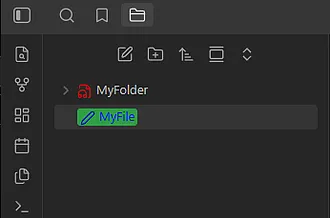
Iconik
这个插件还未经过Obsidian官方人员的人工审核。你可以自定义图标和文字颜色。
Iconik Iconik 适用于需要对Obsidian中的文件和文件夹进行个性化设置,以提高辨识度和美观度的场景。
AI
Pkmer
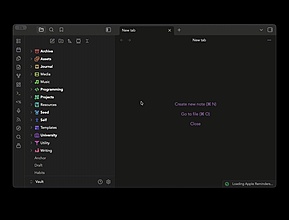
Iconocolor
这个插件还未经Obsidian工作人员手动审核。它是一个集文件夹图标和颜色设置于一体的解决方案,具备自动渐变功能。
Iconocolor 1. 主要功能:这是一款一体化的Obsidian插件,可自定义文件资源管理器中文件夹的图标、图标颜色和文件夹颜色,具备强大的颜色转换和继承系统。功能包括添加自定义图标、搜索预览图标、创建管理调色板、自动配色、颜色转换、子文件夹颜色继承、渐变模式、保存切换配置文件、设置默认图标规则等。 2. 适用场景:适用于需要对Obsidian中的文件夹进行个性化设置,以提高文件管理辨识度和美观度的用户。 3. 核心特色:提供丰富的图标选择,支持自动配色和颜色继承,可通过颜色转换生成不同颜色,还有渐变模式和配置文件功能
AI
Pkmer

Iconoir Icons
一个用于创建和显示定制的SVG Iconoir图标的插件。
Iconoir Icons 该 Obsidian 插件为创建和显示定制的 SVG Iconoir 图标而设计。通过该插件,用户可以搜索建议图标、自定义 CSS 样式、并在文档中使用图标组件。用户可以通过在文档中输入特定语法触发图标名称建议界面,并按照指定的语法规则使用图标组件。此外,插件还提供了丰富的示例代码,展示了图标在不同场景下的应用,包括基本块、列表、标题、callout 样式块和表格。用户可以通过 Obsidian 设置页面安装该插件,或者手动下载并移动文件到指定目录后启用插件。插件还提供了开发指南和注意事项。通过该插
AI
Pkmer
ICOR for Life - Canvases
Draw on a canvas with ink saved in the file, tools to select, pan, draw and erase, shapes and colours for text cards, canvases inside canvases, and under every note the canvases it is on and what it connects to. Part of the ICOR for Life suite. - This plugin has not been manually reviewed by Obsidian staff.
1. 主要功能:支持在画布上直接绘制墨水(笔迹),提供选择、平移、绘制、擦除等工具;支持文本卡片的形状与颜色定制,以及无框纯文本标签。 2. 适用场景:适合需要梳理复杂概念关系、系统草图绘制或视频规划等非线性思维场景。 3. 核心特色: 墨水内嵌:绘制内容直接保存
AI
Pkmer
ICOR for Life - AI Chat
Talk to your AI team where the knowledge lives. A Claude chat inside the vault: it sees the note you have open and the text you selected, answers in readable ICOR cards, and archives your sessions as notes. Part of the ICOR for Life suite. - This plugin has not been manually reviewed by Obsidian staff.
该插件在 Obsidian 库内集成 Claude 聊天窗口。它能直接读取当前打开的笔记及选中的文本,将对话上下文无缝融入 AI 回答中,并将会话自动归档为笔记。 适用于需要基于特定笔记内容、项目背景或关联文档进行深度问答的场景。特别适合避免将笔记内容复制到外部聊天窗口时丢失关键上下文的痛点,仅限桌面端(Obsidian 1.8.7+)使用。
AI
Pkmer
ICOR for Life - Connect
Your app.myicor.com account inside your vault: ICOR Journey and Growth Assignment dashboards, knowledge-base search, reflections synced as notes you own, and myICOR context for Claude sessions. Part of the ICOR for Life suite. - This plugin has not been manually reviewed by Obsidian staff.
该插件将 myICOR 账户直接集成至 Obsidian 库中,提供 ICOR Journey 仪表盘、成长任务进度追踪、内部知识库搜索,并将反思笔记同步为用户拥有的本地笔记,同时支持课程访问及 Claude 会话上下文集成。 专为 myICOR 会员设计,适用于希望将在线学习内容与本地笔记库无缝结合的用户。特别适合在 Obsidian 中记录学习心得、查阅知识库或追踪个人成长路径时,避免在浏览器与笔记软件间频繁切换。
AI
Pkmer
ICOR for Life - Focus
See where your attention actually goes: you sit in the center of the map, today's work orbits close, older work ripples outward, and every entity type keeps its own color and shape. Part of the ICOR for Life suite. - This plugin has not been manually reviewed by Obsidian staff.
ICOR for Life - Focus 是一款可视化注意力分布的插件。它以用户为中心,将今日工作置于内圈,旧工作向外扩散,通过距离、大小和颜色直观展示近期工作重心及实体类型(如项目、习惯等)。 适合每周初回顾上周实际工作成果,或用于检测长期未触碰但计划探索的主题。它帮助用户区分“记忆中的工作”与“实际投入的注意力”,发现被忽视的项目或停滞的目标。
AI
Pkmer
ICOR for Life - Outliner
Lists that behave like an outline: indent, outdent and move a bullet together with everything under it, Enter that knows about children, a cursor that stays out of the bullet, and a select-all that climbs. Part of the ICOR for Life suite. - This plugin has not been manually reviewed by Obsidian staff.
该插件将 Obsidian 中的列表转化为智能大纲。核心在于“整体移动”:缩进、反缩进或移动项目时,其所有子项会随之移动,避免子项遗留。此外,Enter 键智能识别层级,光标始终保持在内容区而非符号前,全选操作可逐级向上扩展。 适用于任何“结构”与“内容”同等重要的场景,如课程大纲、视频脚本、会议议程及项目计划。特别适合需要频繁调整逻辑结构、重新排列思想层级的用户。
AI
Pkmer
ICOR for Life - PDF Annotation
Highlight text or draw a box on a PDF and get a note in the vault for it, with a deep link back, a card on any canvas by drag and drop, and a sidebar of every highlight in the open PDF. Part of the ICOR for Life suite. - This plugin has not been manually reviewed by Obsidian staff.
该插件允许用户在 Obsidian 中直接对 PDF 进行高亮或框选标注。与常规高亮不同,它会为每处标注自动生成一个独立的笔记文件,包含原文引用及用户添加的个人思考,并支持生成指向 PDF 原位置的反向链接。 适用于需要长期积累和管理文献阅读笔记的场景。特别适合那些希望将分散在多个 PDF 中的关键段落汇总到特定主题页面(Topic Page),或拖拽到白板(Canvas)进行视觉化整理,以便日后快速回顾和检
AI
Pkmer
ICOR for Life - Planner
Plan your week on one board inside your vault: Todoist, ClickUp, starred email and Google Calendar sync in as markdown notes you drag onto your days, with two-way sync behind explicit toggles. Part of the ICOR for Life suite. - This plugin has not been manually reviewed by Obsidian staff.
1. 统一
AI
Pkmer
ICOR for Life - Scaffold Check
Is your vault up to date with the ICOR for Life Scaffold, and is what it has still intact? Compares the vault with the latest scaffold version, read-only, and writes a report you can fix by hand or hand to your AI. Part of the ICOR for Life suite. - This plugin has not been manually reviewed by Obsidian staff.
该插件用于检测 Obsidian 仓库(Vault)是否与最新的“ICOR for Life”脚手架及 myPKA 版本保持同步。它通过只读方式对比当前仓库状态与上游最新版本,生成一份详细的差异报告,指出缺失、修改、移动或上游更新的文件。 适用于使用 ICOR for Life 体系的用户,特别是当仓库经过长期使用出现结构漂移(如
AI
Pkmer