obsidian社区插件
QuickAdd 脚本 - 更新说明 - 新增标题分割&关联笔记重组的功能 
插件ID:quickadd-%E8%84%9A%E6%9C%AC-%E6%9B%B4%E6%96%B0%E8%AF%B4%E6%98%8E-%E6%96%B0%E5%A2%9E%E6%A0%87%E9%A2%98%E5%88%86%E5%89%B2%E5%85%B3%E8%81%94%E7%AC%94%E8%AE%B0%E9%87%8D%E7%BB%84%E7%9A%84%E5%8A%9F%E8%83%BD quickadd-%E8%84%9A%E6%9C%AC-%E6%9B%B4%E6%96%B0%E8%AF%B4%E6%98%8E-%E6%96%B0%E5%A2%9E%E6%A0%87%E9%A2%98%E5%88%86%E5%89%B2%E5%85%B3%E8%81%94%E7%AC%94%E8%AE%B0%E9%87%8D%E7%BB%84%E7%9A%84%E5%8A%9F%E8%83%BD quickadd %E8%84%9A%E6%9C%AC-%E6%9B%B4%E6%96%B0%E8%AF%B4%E6%98%8E-%E6%96%B0%E5%A2%9E%E6%A0%87%E9%A2%98%E5%88%86%E5%89%B2%E5%85%B3%E8%81%94%E7%AC%94%E8%AE%B0%E9%87%8D%E7%BB%84%E7%9A%84%E5%8A%9F%E8%83%BD:QuickAdd 脚本更新说明 - 新增标题分割&关联笔记重组的功能
QuickAdd 脚本 - 更新说明 - 新增标题分割&关联笔记重组的功能
文本的脚本是在 QuickAdd脚本-移动子笔记或附件到当前文件夹 脚本的基础上后续更新的版本。
前言
在 Obsidian 中处理长文档时,我习惯按大纲章节拆分,分别记录各小节内容,并配合 Multiple Notes Outline 插件来查看整体结构。但后续的合并整理与导出操作比较繁琐,打算采用笔记重组的方式来完成这些任务,主要用于实现大纲笔记的合并&分割,或者撰写文章的时候标题分割小章节撰写之后合并,预期功能:
- 笔记分割>按选定标题分割,嵌入文件名需要添加
YYMMDD_或文件名_前缀 - 笔记合并>只合并关联笔记内容,跟嵌入笔记在原文里面存在形式无关
Tip:此脚本非常适合 FolderNote 格式的笔记。
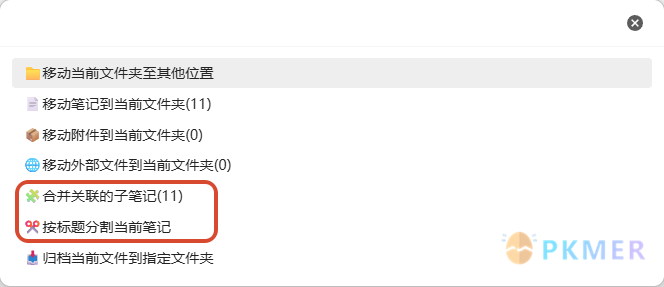
功能 1:🧩 合并关联的子笔记
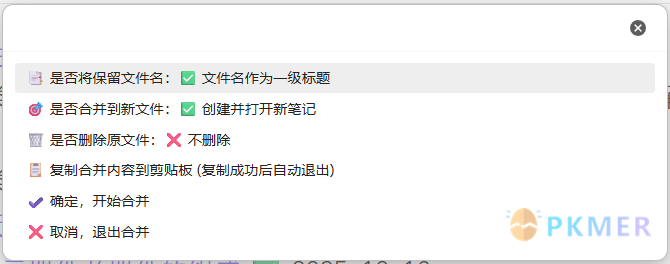
- 一键提取当前文档关联的子笔记内容,按顺序合并到新文件
- 合并完成后自动创建
当前文件名_merged.md并在编辑器中打开 - 支持批量处理多个关联笔记,保持原始文档结构
- 支持选中区域识别,从选中的多行文本中提取所有的
[[双链]]或[Markdown](链接) - 智能内容处理
- YAML 自动剔除:删除每个子笔记顶部的 YAML 元数据,保持合并后文档纯净
- 标题深度清理:自动移除文件名中的日期前缀(如
24.03.15_或240315_)以及【标签】字样 - 文件过滤:精准识别并排除
.excalidraw.md绘图文件
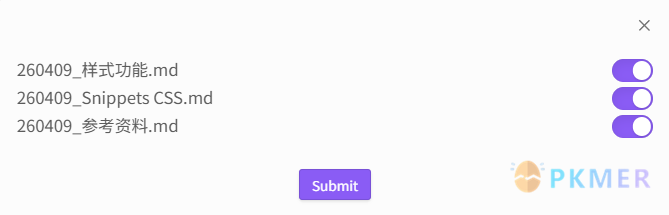
功能 2:✂️ 按标题分割当前笔记
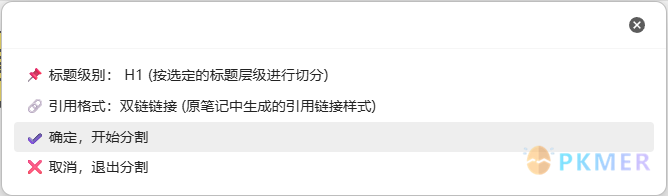
- 按标题分割当前笔记并引用到当前文件
- 自动识别文档的标题类型,可自定义分割标题等级:H1~H6
- 支持不同类型的嵌入格式:None、嵌入笔记、双链链接、无序列表、有序列表
效果演示

注意事项
- 如果合并效果有问题,在不删除原文件的情况下可以通过 Ctrl+Z 来撤销操作,如果删除了原文件的话,请到
.trash文件夹中进行恢复。 - 本脚本的笔记重组功能不支持脚本的引用的识别功能,就是单纯的内容读写操作,如果笔记重组后中存在引用脚本的丢失请撤回操作。
- 笔记分割的嵌入式的文件名处理(添加日期前缀 + 移除
【标签】标识)是根据我自己的使用情况来处理的,如果跟你的笔记格式有冲突,请自行修改源码,或者拿给 AI 修改。
更新说明
2026-04-10
- 在设置「删除原文件」的选项之后,「复制到剪切板」的选项会复制内容后自动删除原文件
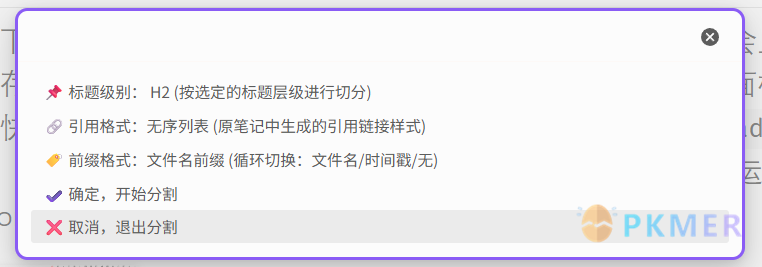
- 「标题分割」可以设置 4 种前缀格式
- 分割的文件名作为前缀(
filename_head) - 时间戳前缀(
timestamp_head) - 日期前缀(
YYMMDD_head) - 无前缀(
head)
- 分割的文件名作为前缀(
- 「标题分割」支持指定的分割的标题(显示的是处理后的标题)
- 优化路径检测逻辑,自动识别并排除处于当前目录子文件夹中的 Folder Note 笔记(笔记名与父文件夹同名)。
脚本源码
/*
* @Author: 熊猫别熬夜
* @Date: 2024-03-18 02:30:36
* @Last Modified by: 熊猫别熬夜
* @Last Modified time: 2026-04-08 23:55:57
*/
// 导入所需模块
const path = require('path');
const fs = require('fs');
const quickAddApi = app.plugins.plugins.quickadd.api;
const files = app.vault.getFiles();
// 获取当前活动文件和缓存的元数据
const file = app.workspace.getActiveFile();
const cachedMetadata = app.metadataCache.getFileCache(file);
let listPaths = app.vault.getAllFolders().map(f => f.path);
listPaths.unshift("/");
// 导出异步函数
module.exports = {
entry: async (QuickAdd, settings, params) => {
let editor;
let selection;
try {
// 获取选中的文本
editor = app.workspace.activeEditor.editor;
// // 获取选中的文本否则自动获取当前行的文本
// selection = editor.getSelection();
// 选择所在的一行
const line = editor.getLine(editor.getCursor().line);
// 获取选中的文本否则自动获取当前行的文本
selection = editor.getSelection() ? editor.getSelection() : line;
} catch {
new Notice("❌获取选中文本失败");
return;
}
let selectionLinks = [];
if (selection) {
selectionLinks = extractAllWikiLinks(selection);
}
console.log("选中链接:", selectionLinks);
let links = [];
let embeds = [];
// 提取链接和嵌入的文件
if (cachedMetadata.links) {
links = cachedMetadata.links.map(l => l.link);
}
if (cachedMetadata.embeds) {
embeds = cachedMetadata.embeds.map(e => e.link);
}
let allLinks = [...links, ...embeds];
console.log(allLinks);
// 提取外部文件链接 (file://)
let externalFiles = [];
let fileContent = '';
try {
fileContent = await app.vault.read(file);
externalFiles = extractExternalFileLinks(fileContent);
console.log('外部文件:', externalFiles);
} catch (error) {
console.error('读取文件内容失败:', error);
}
// 获取所有文件和链接文件路径
let linkFilePaths = [];
const sourceLinks = selectionLinks.length > 0 ? selectionLinks : allLinks;
for (let i = 0; i < sourceLinks.length; i++) {
const link = sourceLinks[i];
const filePath = getFilePath(files, link);
if (filePath) {
linkFilePaths.push(filePath);
}
};
console.log("最终链接路径:", linkFilePaths);
// 检查链接文件是否在同一文件夹中
const activefile = app.workspace.getActiveFile();
console.log(activefile);
const check = checkLinkNotesInSameFolder(activefile.path, linkFilePaths);
// 筛选可移动的文件类型
const moveFiles = linkFilePaths.filter((filePath, index) => !check[index]);
// 筛选附件和笔记
const attachmentTypes = ['md', 'canvas', 'excalidraw'];
// const notes = moveFiles.filter(link => attachmentTypes.some(type => link.endsWith('.' + type)) && !link.endsWith('.excalidraw.md'));
const notes = moveFiles.filter(link => attachmentTypes.some(type => link.endsWith('.' + type)));
const attachments = moveFiles.filter(link => !notes.includes(link));
// 筛选关联子笔记用于合并 (仅限当前文件夹内的笔记)
let mergeNotes = [...new Set(linkFilePaths.filter(p => p.endsWith('.md') && !p.endsWith('.excalidraw.md')))];
// 提示用户选择移动类型
const choices = [
`📁移动当前文件夹至其他位置`,
`📄移动笔记到当前文件夹(${notes.length})`,
`📦移动附件到当前文件夹(${attachments.length})`,
`🌐移动外部文件到当前文件夹(${externalFiles.length})`,
`🧩合并关联的子笔记(${mergeNotes.length})`,
`✂️按标题分割当前笔记`,
`📥归档当前文件到指定文件夹`
];
const choice = await quickAddApi.suggester(choices, choices);
if (!choice) return;
if (choice === choices[0]) {
const choice = await quickAddApi.suggester(listPaths, listPaths);
if (!choice) return;
const newFilePath = path.join(choice, path.basename(path.dirname(activefile.path)));
const oldFolderPath = path.dirname(activefile.path);
await app.fileManager.renameFile(app.vault.getAbstractFileByPath(oldFolderPath), newFilePath);
new Notice(`📁已移动${oldFolderPath}文件夹至${newFilePath}`, 1000);
return;
} else if (choice === choices[6]) {
// 2024-04-10_15:37:归档文件或者FolderNote
const archiveFolder = settings["归档路径"] + (settings["归档格式"] ? "/" + quickAddApi.date.now(settings["归档格式"]) : "");
if (!(await app.vault.getFolderByPath(archiveFolder))) {
await app.vault.createFolder(archiveFolder);
}
const fileName = path.basename(activefile.path);
const oldFilePath = activefile.path;
const isFolderNote = path.basename(path.dirname(oldFilePath)) === fileName.replace(".md", "").replace(".canvas", "");
if (isFolderNote) {
const newFilePath = path.join(archiveFolder, fileName.replace(".md", "").replace(".canvas", ""));
const oldFolderPath = path.dirname(oldFilePath);
await app.fileManager.renameFile(app.vault.getAbstractFileByPath(oldFolderPath), newFilePath);
new Notice(`📥已归档📁${oldFolderPath}`, 1000);
} else {
const newFilePath = path.join(archiveFolder, fileName);
await app.fileManager.renameFile(app.vault.getAbstractFileByPath(oldFilePath), newFilePath);
new Notice(`📥已归档📝${fileName}`, 1000);
}
return;
} else if (choice === choices[5]) {
// ✂️按标题分割当前笔记
const activeFile = app.workspace.getActiveFile();
const cachedMetadata = app.metadataCache.getFileCache(activeFile);
const fileContent = await app.vault.read(activeFile);
if (!cachedMetadata.headings || cachedMetadata.headings.length === 0) {
new Notice("❌该笔记中没有标题!");
return;
}
const levels = new Set(cachedMetadata.headings.map(h => h.level));
const sortedLevels = Array.from(levels).sort();
// 默认参数配置
let selectedLevel = sortedLevels[0];
const linkFormats = ["None", "双链链接", "嵌入笔记", "无序列表", "有序列表"];
let selectedFormat = "无序列表";
let prefixType = "文件名前缀";
const prefixTypes = ["文件名前缀", "时间戳前缀", "日期前缀", "无前缀"];
// 参数配置循环 (参考切换副本脚本)
while (true) {
const options = [
`📌 标题级别: H${selectedLevel} (按选定的标题层级进行切分)`,
`🔗 引用格式:${selectedFormat} (原笔记中生成的引用链接样式)`,
`🏷️ 前缀格式:${prefixType} (循环切换:文件名/时间戳/日期/无)`,
"✔️ 确定,开始分割",
"❌ 取消,退出分割"
];
const select = await quickAddApi.suggester(options, options);
if (!select || select === options[4]) return;
if (select === options[0]) {
const levelStr = await quickAddApi.suggester(
sortedLevels.map(l => `H${l}`),
sortedLevels.map(l => l.toString())
);
if (levelStr) selectedLevel = parseInt(levelStr);
} else if (select === options[1]) {
const format = await quickAddApi.suggester(linkFormats, linkFormats);
if (format) selectedFormat = format;
} else if (select === options[2]) {
const currentIndex = prefixTypes.indexOf(prefixType);
prefixType = prefixTypes[(currentIndex + 1) % prefixTypes.length];
} else if (select === options[3]) {
break;
}
}
// 筛选出选定级别的标题
const targetHeadings = cachedMetadata.headings.filter(h => h.level === selectedLevel);
const allHeadings = cachedMetadata.headings;
let filePrefix = "";
if (prefixType === "文件名前缀") {
filePrefix = activeFile.basename.replace(/[*"\\/<>:|?]/g, '-') + "_";
} else if (prefixType === "时间戳前缀") {
filePrefix = Date.now().toString() + "_";
} else if (prefixType === "日期前缀") {
filePrefix = quickAddApi.date.now("YYMMDD") + "_";
} else {
filePrefix = "";
}
// 让用户选择要分割的标题 (展示实际生成的完整文件名)
const headingLabels = targetHeadings.map((h, i) => {
const cleanTitle = h.heading.replace(/[*"\\/<>:|?]/g, '-').trim();
return `${filePrefix}${cleanTitle}.md` + "\u200B".repeat(i);
});
const selectedLabels = await quickAddApi.checkboxPrompt(headingLabels, headingLabels);
if (!selectedLabels || selectedLabels.length === 0) return;
const selectedIndices = selectedLabels.map(l => headingLabels.indexOf(l));
const currentDir = path.dirname(activeFile.path);
// 获取前导内容 (第一个选定标题之前的内容)
let updatedFileContent = fileContent.substring(0, targetHeadings[0].position.start.offset);
let linkCount = 0;
for (let i = 0; i < targetHeadings.length; i++) {
const currentHeading = targetHeadings[i];
const startOffset = currentHeading.position.start.offset;
// 确定结束位置:下一个同级或更高级别的标题,或者文件末尾
let endOffset = fileContent.length;
for (let j = 0; j < allHeadings.length; j++) {
const h = allHeadings[j];
if (h.position.start.offset > startOffset && h.level <= selectedLevel) {
endOffset = h.position.start.offset;
break;
}
}
if (!selectedIndices.includes(i)) {
// 如果该标题未被选中,则保留在原笔记中
const rawSection = fileContent.substring(startOffset, endOffset);
updatedFileContent += rawSection;
continue;
}
// 只有选中的标题才会执行分割逻辑
linkCount++;
const sectionContent = fileContent.substring(startOffset, endOffset).trim();
const cleanTitle = currentHeading.heading.replace(/[*"\\/<>:|?]/g, '-').trim();
const newFileName = `${filePrefix}${cleanTitle}.md`;
const newFilePath = path.join(currentDir, newFileName).replace(/\\/g, '/');
// 创建子笔记
let subFile = app.vault.getAbstractFileByPath(newFilePath);
if (!subFile) {
subFile = await app.vault.create(newFilePath, sectionContent);
new Notice(`📄已创建: ${newFileName}`, 500);
} else {
await app.vault.modify(subFile, sectionContent);
new Notice(`⚠️已更新: ${newFileName}`, 500);
}
// 根据格式生成引用链接
let linkStr = "";
const linkText = currentHeading.heading;
switch (selectedFormat) {
case "None":
linkStr = "";
break;
case "双链链接":
linkStr = `[[${newFileName}|${linkText}]]\n\n`;
break;
case "嵌入笔记":
linkStr = `![[${newFileName}]]\n\n`;
break;
case "无序列表":
linkStr = `- [[${newFileName}|${linkText}]]\n`;
break;
case "有序列表":
linkStr = `${linkCount}. [[${newFileName}|${linkText}]]\n`;
break;
}
updatedFileContent += linkStr;
}
// 更新原笔记内容
await app.vault.modify(activeFile, updatedFileContent.trim());
new Notice(`✅笔记分割完成 (格式: ${selectedFormat})`);
return;
} else if (choice === choices[4]) {
// 🔗关联子笔记重组
if (mergeNotes.length === 0) {
new Notice('❌未找到关联子笔记', 2000);
return;
}
const labels = mergeNotes.map(p => path.basename(p));
let selectedLabels = [];
if (mergeNotes.length > 1) {
selectedLabels = await quickAddApi.checkboxPrompt(labels, labels);
} else {
selectedLabels = labels;
}
if (!selectedLabels || selectedLabels.length === 0) return;
// 参数配置
let includeTitle = true;
let mergeTarget = true;
let deleteSource = false;
while (true) {
const options = [
`📑 是否将保留文件名:${includeTitle ? "✅ 文件名作为一级标题" : "❌ 不保留文件名,只合并文档内容"}`,
`🎯 是否合并到新文件:${mergeTarget ? "✅ 创建并打开新笔记" : "❌ 覆盖当前文档正文 (保留YAML)"}`,
`🗑️ 是否删除原文件:${deleteSource ? "✅ 删除 (需配合“覆盖当前”/“复制到剪贴板”)" : "❌ 不删除"}`,
"📋 复制合并内容到剪贴板 (复制成功后自动退出)",
"✔️ 确定,开始合并",
"❌ 取消,退出合并"
];
const select = await quickAddApi.suggester(options, options);
if (!select || select === options[5]) return;
if (select === options[0]) {
includeTitle = !includeTitle;
} else if (select === options[1]) {
mergeTarget = !mergeTarget;
if (mergeTarget) deleteSource = false; // 选新文件则不能删原文件
} else if (select === options[2]) {
deleteSource = !deleteSource;
if (deleteSource) mergeTarget = false; // 选删原文件则强制覆盖当前
} else if (select === options[3]) {
// 📋 复制合并内容到剪贴板 (直接退出)
let mergedContent = "";
let sourceFiles = [];
for (const label of selectedLabels) {
const notePath = mergeNotes.find(p => path.basename(p) === label);
const noteFile = app.vault.getAbstractFileByPath(notePath);
if (noteFile) {
sourceFiles.push(noteFile);
const content = getMarkdownText(notePath);
if (mergedContent) mergedContent += "\n\n";
if (includeTitle) {
// 处理标题:移除日期前缀 (YY.MM.DD_ 或 YYMMDD_) 和 当前笔记名前缀,以及 【标签】
const activeName = activeFile.basename.replace(/[*"\\/<>:|?]/g, '-');
const cleanTitle = noteFile.basename
.replace(/^(\d{2,4}[-.]?\d{2}[-.]?\d{2}[_ ]?)/, '') // 移除时间前缀 (YYMMDD_ 或 YYYY-MM-DD )
.replace(new RegExp(`^${escapeRegExp(activeName)}[_ -]?`, 'i'), '') // 移除笔记名前缀
.replace(/【.*?】/g, '') // 移除【标签】
.trim();
mergedContent += `# ${cleanTitle}\n\n${content}`;
} else {
mergedContent += content;
}
}
}
copyToClipboard(mergedContent);
if (deleteSource) {
const activeFile = app.workspace.getActiveFile();
let deleteCount = 0;
for (const fileToDelete of sourceFiles) {
if (fileToDelete.path !== activeFile.path) {
await app.vault.trash(fileToDelete, true);
deleteCount++;
}
}
new Notice(`📋 已复制并删除了 ${deleteCount} 个原文件`, 2000);
} else {
new Notice("📋 已复制合并内容到剪贴板", 2000);
}
return;
} else if (select === options[4]) {
break;
}
}
let mergedContent = "";
let sourceFiles = [];
for (const label of selectedLabels) {
const notePath = mergeNotes.find(p => path.basename(p) === label);
const noteFile = app.vault.getAbstractFileByPath(notePath);
if (noteFile) {
sourceFiles.push(noteFile);
// 始终排除 YAML
const content = getMarkdownText(notePath);
if (mergedContent) mergedContent += "\n\n";
if (includeTitle) {
// 处理标题:移除日期前缀 (YY.MM.DD_ 或 YYMMDD_) 和 当前笔记名前缀,以及 【标签】
const activeName = activeFile.basename.replace(/[*"\\/<>:|?]/g, '-');
const cleanTitle = noteFile.basename
.replace(/^(\d{2,4}[-.]?\d{2}[-.]?\d{2}[_ ]?)/, '') // 移除时间前缀 (YYMMDD_ 或 YYYY-MM-DD )
.replace(new RegExp(`^${escapeRegExp(activeName)}[_ -]?`, 'i'), '') // 移除笔记名前缀
.replace(/【.*?】/g, '') // 移除【标签】
.trim();
mergedContent += `# ${cleanTitle}\n\n${content}`;
} else {
mergedContent += content;
}
}
}
const activeFile = app.workspace.getActiveFile();
if (!mergeTarget) {
const currentFullContent = await app.vault.read(activeFile);
// 提取 YAML 部分 (包括分隔符和末尾换行)
const yamlMatch = currentFullContent.match(/^---[\s\S]*?---\n*/);
const yamlPart = yamlMatch ? yamlMatch[0] : "";
// 组合新内容:保留 YAML + 合并后的子笔记正文
await app.vault.modify(activeFile, yamlPart + mergedContent);
new Notice("✅已更新当前文件 (保留YAML,覆盖正文)", 2000);
} else {
const currentDir = path.dirname(activeFile.path);
const newFileName = `${activeFile.basename}_merged.md`;
const newFilePath = path.join(currentDir, newFileName).replace(/\\/g, '/');
let newFile = app.vault.getAbstractFileByPath(newFilePath);
if (newFile) {
await app.vault.modify(newFile, mergedContent);
new Notice(`✅已覆盖更新: ${newFileName}`, 2000);
} else {
newFile = await app.vault.create(newFilePath, mergedContent);
new Notice(`✅已创建新笔记: ${newFileName}`, 2000);
}
// 打开新笔记
await app.workspace.getLeaf().openFile(newFile);
}
// 如果选择删除原文件,则进行删除操作
if (deleteSource) {
for (const fileToDelete of sourceFiles) {
// 确保不删除当前正在编辑的文件
if (fileToDelete.path !== activeFile.path) {
await app.vault.trash(fileToDelete, true);
}
}
new Notice(`🗑️已删除 ${sourceFiles.length} 个原文件`, 2000);
}
return;
} else if (choice === choices[3]) {
// 移动外部文件
if (externalFiles.length === 0) {
new Notice('❌未找到外部文件链接', 2000);
return;
}
// 用户选择具体的外部文件
const labels = externalFiles.map(p => path.basename(p));
const selectedItems = await quickAddApi.checkboxPrompt(labels, labels);
if (!selectedItems || selectedItems.length === 0) return;
// 复制外部文件到当前文件夹
const activefile = app.workspace.getActiveFile();
const targetDir = path.dirname(activefile.path);
const vaultBasePath = app.vault.adapter.basePath;
// 记录需要替换的链接映射(原始 file:// URL 字符串 -> 新的 Obsidian 链接)
const linkReplacements = new Map();
let updatedContent = fileContent;
for (const label of selectedItems) {
const externalFilePath = externalFiles.find(p => path.basename(p) === label);
try {
// 检查源文件是否存在
if (!fs.existsSync(externalFilePath)) {
new Notice(`❌文件不存在: ${path.basename(externalFilePath)}`, 2000);
continue;
}
// 目标文件路径(相对于 vault 根目录)
const targetFilePath = path.join(targetDir, path.basename(externalFilePath)).replace(/\\/g, '/');
const vaultTargetPath = path.join(vaultBasePath, targetFilePath);
// 检查目标文件是否已存在
if (fs.existsSync(vaultTargetPath)) {
new Notice(`⚠️文件已存在: ${path.basename(externalFilePath)}`, 2000);
} else {
// 确保目标目录存在
const targetDirPath = path.dirname(vaultTargetPath);
if (!fs.existsSync(targetDirPath)) {
fs.mkdirSync(targetDirPath, { recursive: true });
}
// 复制文件
fs.copyFileSync(externalFilePath, vaultTargetPath);
new Notice(`📋已复制 ${path.basename(externalFilePath)}`, 1000);
}
// 提取文件内容中匹配的原始 file:// URL 字符串
const fileName = path.basename(externalFilePath);
const newLink = `![[${fileName}]]`;
const originalUrl = findFileUrlInContent(fileContent, externalFilePath);
if (originalUrl) {
linkReplacements.set(originalUrl, newLink);
}
} catch (error) {
console.error('复制外部文件失败:', error);
new Notice(`❌复制失败: ${path.basename(externalFilePath)}`, 2000);
}
}
// 更新文件内容中的链接
if (linkReplacements.size > 0) {
try {
// 替换文件内容中的 file:// 链接
for (const [originalUrl, newLink] of linkReplacements.entries()) {
// 匹配  或  格式
// 需要转义原始 URL 中的特殊字符,但保留正则表达式元字符的转义
const escapedUrl = escapeRegExp(originalUrl);
const imgPattern = new RegExp(`!\\[([^\\]]*)\\]\\(${escapedUrl}\\)`, 'g');
updatedContent = updatedContent.replace(imgPattern, (match, altText) => {
return altText ? `![${altText}]${newLink}` : newLink;
});
}
// 保存更新后的内容
if (updatedContent !== fileContent) {
await app.vault.modify(activefile, updatedContent);
new Notice("✅已更新文件中的链接格式", 2000);
}
} catch (error) {
console.error('更新文件链接失败:', error);
new Notice('⚠️文件已复制,但更新链接失败', 2000);
}
}
new Notice("✅已复制外部文件到当前文件夹");
return;
}
// 根据用户选择筛选链接
const filteredLinks = choice === choices[1] ? notes : attachments;
// 用户选择具体文件
const labels = filteredLinks.map(p => path.basename(p));
const selectedItems = await quickAddApi.checkboxPrompt(labels, labels);
if (!selectedItems) return;
// 匹配选择的文件路径
const matchedLinkFilePaths = selectedItems.map((label) => {
return linkFilePaths.find((linkFilePath) => path.basename(linkFilePath) === label);
});
if (!matchedLinkFilePaths) return;
console.log(matchedLinkFilePaths);
// 移动文件到当前文件夹
for (let i = 0; i < matchedLinkFilePaths.length; i++) {
const oldFilePath = matchedLinkFilePaths[i];
// 2024-03-22_11:41:如果存在FolderNote,则移动的是整个文件夹
const fileName = path.basename(oldFilePath);
const isFolderNote = path.basename(path.dirname(oldFilePath)) === fileName.replace(".md", "").replace(".canvas", "");
if (isFolderNote) {
const newFilePath = path.join(path.dirname(activefile.path), fileName.replace(".md", "").replace(".canvas", ""));
const oldFolderPath = path.dirname(oldFilePath);
await app.fileManager.renameFile(app.vault.getAbstractFileByPath(oldFolderPath), newFilePath);
new Notice(`📁已移动${oldFolderPath}文件夹至${newFilePath}`, 1000);
} else {
const newFilePath = path.join(path.dirname(activefile.path), path.basename(oldFilePath));
await app.fileManager.renameFile(app.vault.getAbstractFileByPath(oldFilePath), newFilePath);
new Notice(`📄已移动${matchedLinkFilePaths[i]}`, 1000);
}
}
new Notice("✅已移动文件到当前文件夹");
},
settings: {
name: "移动子笔记或附件",
author: "熊猫别熬夜",
options: {
"归档路径": {
type: "dropdown",
defaultValue: "800【存档】Archive",
options: listPaths,
},
"归档格式": {
type: "text",
defaultValue: "YYYY",
description: "可以设置以时间格式划分子文件夹,YYYY(年),MM(月),DD(日)",
},
}
}
};
// 获取文件路径函数
// [PKMer\_QuickAdd 脚本 - 移动子笔记或附件到当前文件夹 - #5,来自 Probe - Blog - PKMer](https://forum.pkmer.net/t/topic/1885/5)
function getFilePath(files, baseName) {
// 下一行的原先 baseName => 改成 path.basename(baseName)
let files2 = files.filter(f => path.basename(f.path).replace(".md", "") === path.basename(baseName).replace(".md", ""));
let filePath = files2.map((f) => f.path);
return filePath[0];
}
// 检查链接文件是否在同一文件夹中函数
function checkLinkNotesInSameFolder(activeFilePath, linkFilePaths) {
const activeFileDir = path.dirname(activeFilePath);
let check = [];
for (let i = 0; i < linkFilePaths.length; i++) {
const linkFilePath = linkFilePaths[i];
const linkFileDir = path.dirname(linkFilePath);
if (activeFileDir === linkFileDir) {
check.push(true);
} else {
// 2026-04-10: 检测是否为 FolderNote 笔记 (笔记名与父文件夹名一致)
const fileName = path.basename(linkFilePath);
const pureFileName = fileName.replace(".md", "").replace(".canvas", "");
const parentFolderName = path.basename(linkFileDir);
if (pureFileName === parentFolderName) {
// 如果父文件夹所在的目录就是当前文件所在的目录 (即已经在当前目录下的子文件夹中且为 FolderNote)
const grandparentDir = path.dirname(linkFileDir);
if (activeFileDir === grandparentDir) {
check.push(true);
continue;
}
}
check.push(false);
}
}
return check;
};
function matchSelectionEmbed(text) {
const regex = /\[\[?([^\]]*?)(\|.*)?\]\]?\(?([^)\n]*)\)?/;
const matches = text.match(regex);
if (!matches) return;
if (matches[3]) return decodeURIComponent(matches[3]);
if (matches[1]) return decodeURIComponent(matches[1]);
}
// 提取所有 Wiki 链接或嵌入
function extractAllWikiLinks(text) {
// 匹配 [[Link]] 或 ![[Embed]]
const wikiRegex = /!?\[\[([^\]|#]+)(?:[|#][^\]]*)?\]\]/g;
const links = [];
let match;
while ((match = wikiRegex.exec(text)) !== null) {
links.push(match[1]);
}
// 同时支持提取 Markdown 格式链接的路径 [text](path)
const mdLinkRegex = /!?\[[^\]]*\]\(([^)\n\s]+)\)/g;
while ((match = mdLinkRegex.exec(text)) !== null) {
links.push(decodeURIComponent(match[1]));
}
return [...new Set(links)]; // 去重
}
// 提取外部文件链接 (file://) 函数
function extractExternalFileLinks(content) {
// 匹配 file:// 协议链接,支持 Markdown 图片语法 
const fileProtocolRegex = /file:\/\/[\/]?([^\s\)"\]]+)/g;
const matches = [];
let match;
while ((match = fileProtocolRegex.exec(content)) !== null) {
try {
// 解码 URL 编码的路径
let filePath = decodeURIComponent(match[1]);
// 处理 Windows 路径 (file:///D:/... 或 file:///D:\... 转换为 D:/... 或 D:\...)
if (filePath.startsWith('/')) {
filePath = filePath.substring(1);
}
// 如果路径使用正斜杠,转换为系统路径分隔符
filePath = filePath.replace(/\//g, path.sep);
// 检查文件是否存在
if (fs.existsSync(filePath)) {
matches.push(filePath);
}
} catch (error) {
console.error('处理外部文件路径失败:', match[1], error);
}
}
// 去重
return [...new Set(matches)];
}
// 转义正则表达式特殊字符
function escapeRegExp(string) {
return string.replace(/[.*+?^${}()|[\]\\]/g, '\\$&');
}
// 在文件内容中查找匹配的 file:// URL 字符串
function findFileUrlInContent(content, filePath) {
// 匹配 file:// 链接格式
const fileUrlPattern = /file:\/\/[\/]?([^\s\)"\]]+)/g;
let match;
while ((match = fileUrlPattern.exec(content)) !== null) {
try {
let decodedPath = decodeURIComponent(match[1]);
if (decodedPath.startsWith('/')) {
decodedPath = decodedPath.substring(1);
}
decodedPath = decodedPath.replace(/\//g, path.sep);
// 规范化路径进行比较
const normalizedFilePath = path.normalize(filePath);
const normalizedDecodedPath = path.normalize(decodedPath);
if (normalizedFilePath === normalizedDecodedPath ||
normalizedFilePath.toLowerCase() === normalizedDecodedPath.toLowerCase()) {
return match[0]; // 返回完整的 file:// URL
}
} catch (error) {
// 继续尝试下一个匹配
}
}
return null;
}
// 获取文件路径下的 md 中的文本(排除 Yaml)
function getMarkdownText(filePath) {
// 获取文件的完整路径
const fileFullPath = app.vault.adapter.getFullPath(filePath);
// 读取文件内容
const fileContent = fs.readFileSync(fileFullPath, 'utf8');
// 排除首行YAML区域
const markdownText = fileContent.replace(/^---[\s\S]*?---\n*/, '').replace(/\n\n/, "\n");
return markdownText;
}
function copyToClipboard(extrTexts) {
const txtArea = document.createElement('textarea');
txtArea.value = extrTexts;
document.body.appendChild(txtArea);
txtArea.select();
if (document.execCommand('copy')) {
console.log('copy to clipboard.');
} else {
console.log('fail to copy.');
}
document.body.removeChild(txtArea);
}