
Obsidian 插件:Vextab
插件名片
概述
VexTab是一种书写乐谱的语言,通过一些简单的语法可以便捷地编写谱子,并渲染成tab和五线谱。本插件支持了Obsidian中VexTab的渲染。
VexTab is a language that allows you to easily create, edit, and share music notation and guitar tablature. Unlike ASCII tab, which is designed for readability, VexTab is designed for writeability.
——0xfe / Mohit Muthanna Cheppudira(VexTab语法的原作者)
使用
以 C自然大调 的 Mi型音阶 为例:
tabstave notation=true time=C key=C
notes 0-1-3/6 0/5 | 2-3/5 0-2/4 | 3/4 0-2/3 0/2 | 1-3/2 0-1/1 | :w 3/1- tabstave:一行谱子
- notation=true:显示五线谱
- time=4/4:使用4/4拍
- key=C:调式为C
- notes:音符
- 0-1-3/6:6弦上的0、1、3品(默认4分音符)
- :w 3/1:1弦上的3品,全音符
渲染效果:
1. tabstave:创建一行谱子
tabstave2. notes:音符
使用 品级/弦(fret/string) 来表示音符,以1弦0品为例,表示为 0/1:
tabstave
notes 0/1
使用 音符/八度(note/octave) 加上 # @ n 来表示音符,以中央C为例,表示为 C/41:
tabstave notation=true tablature=false
notes C/4
3. 小节
使用 | 分隔小节:
tabstave
notes 0/1 | 0/1 | 0/1 | 0/1
使用 =|| 表示复纵线(乐曲告一段落):
tabstave
notes 0/1 | 0/1 | 0/1 | 0/1 =||
使用 =|: 和 =:| 表示重复开始和重复结束:
tabstave
notes  =|: 0/1 | 0/1 | 0/1 | 0/1 =:|
使用 =:: 表示重复开始和结束:
tabstave
notes  =|: 0/1 | 0/1 | 0/1 =:: 0/1 =:|
使用 =|= 表示终止线:
tabstave
notes 0/1 | 0/1 | 0/1 | 0/1 =|=
总结:不同类型的小节线
|小节线=||复纵线=|:重复开始=:|重复结束=::重复开始和结束=|=终止线
4. 休止符
使用 ## 表示休止符(注意,tab谱上是不会显示休止符的):
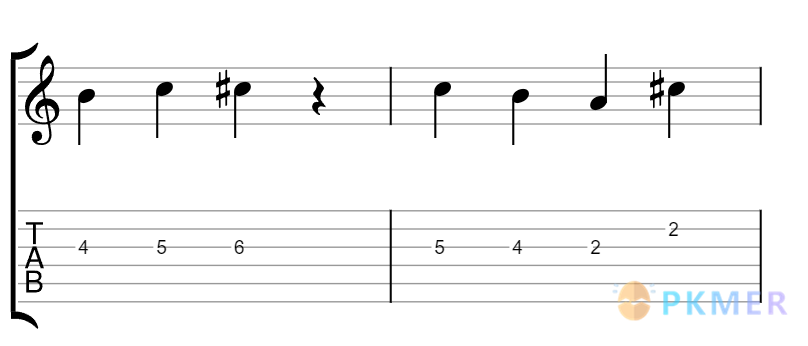
tabstave notation=true time=C
notes 0/1 ## ## ##
5. 时值
使用 :w :h :q :8 :16 :32 表示 全音符 / 二分音符 / 四分音符(默认)/ 八分音符 / 十六分音符 / 三十二分音符,用 ^n^ 表示连音:
tabstave notation=true time=4/4 key=Ab tuning=eb
notes :8 5s7s8/5 ^3^ :q (5/2.6/3)h(7/3) :8d 5/4 :16 5/5
使用 S 表示斜线记法(注意:仅靠注释无法在tab谱中正确表示按弦位置):
tabstave notation=true
time=4/4
notes :2S B/4 :qS B/4 :q ## | :8S B/4 B/4 :qS B-B-B/4 ^3^
text :w, G Maj7, |, Am
添加 options tab-stems=true tab-stem-direction=down 控制tab谱的符干和方向:
options tab-stems=true tab-stem-direction=down

tabstave
notes 0/3 0/3 0/3 0/3 =|=
6. 上拨 / 下拨
用 u 和 d 表示上/下拨弦:
tabstave
notes 0d/1 | 0u/1 | 0d/1 | 0u/1 =|=
7. 和弦
用 ({note}.{note}) 的格式表示和弦:
tabstave
notes (4/1.5/2.6/3)
8. 左手闷音
用 X 表示左手闷音:
tabstave
notes X/3
9. 推弦
用 b 表示推弦,在 b 的前后加推弦前后的效果:
tabstave
notes 4b5-4b6-4b5b4-4b6b4/3
10. 颤音
用 v 和 V 表示颤音和强颤音:
tabstave
notes 4b5v-4b6V-4b5b4v-4b6b4V/3
11. 击弦 / 勾弦 / 点弦 / 滑弦
用 h p t s 表示 击弦 / 勾弦 / 点弦 / 滑弦:
tabstave
notes (5/2.5/3.7/4) 5h6/3 7/4 |
notes t12p7p5h7/4 7/5 5s3/5
tabstave
notes (5/4.5/5)s(7/4.7/5)s(5/4.5/5) (5/4.5/5)h(7/5) |
notes t(12/5.12/4)s(5/5.5/4) 3b4/5 5V/612. 衔接音
这里已经涉及我的知识盲区了,以下是 叶大侠文章 中的示例:
options space=20 font-style=italic
font-face=times font-size=10

tabstave notation=true tablature=false
notes :q
notes C/4 $.a./bottom.$
notes E/4 $.av/bottom.$
notes G/4 $.a>/bottom.$
notes B/4 $.a-/bottom.$
notes C/5 $.a^/top.$
notes E/5 $.a+/top.$
notes G/5 $.ao/top.$

text :q,.-1,.strict,Stacatto,Staccatissimo
text Accent,Tenuto,Marcato,LH pizzicato,Snap pizzicato
text ++,.12,.font=courier-12-,:q,a.,av,a>,a-,a^,a+,ao

options space=120 font-style=italic
font-face=times font-size=10

tabstave notation=true tablature=false
notes :q
notes C/4 $.ah/bottom.$
notes E/4 $.a@a/top.$
notes G/4 $.a@u/bottom.$
notes B/4 $.a|/bottom.$
notes C/5 $.am/top.$

text :q,.-1,.strict,Open Note,Up Fermata
text Down Fermata,Bow Up,Bow Down
text ++,.12,.font=courier-12-,:q,ah,a@a,a@u,a|,am

options space=40
13. 反复
用 |#coda |#segno 表示反复符号(D. S. al coda 用斜体写作注释即可):
options space=20 font-size=12

tabstave notation=true tablature=false
time=4/4 key=Ab tuning=eb
notes :q =|: C-D-E-F/4 =:| G-A-B/4 C/5
text |#coda, :hd, , :q, #tr, |#segno
text ++, .11, |, #f
text ++, .0, .font=Times-12-italic, |, :w, ,|, :q, ,D.S. al coda

options space=25
14. 歌词 / 注释
用 ${content}$ 辅以 $.bottom.$ $.top.$ 写注释和歌词:
tabstave
notes 0/1 $哈$ | 0/1 $基$ | 0/1 $米$ | 0/1 $.top.$ $!$ =||
用 $.big.{content}$、 $.medium.{content}$ 和 $.italic.{content}$ 的预设显示不同的样式:
tabstave
notes 0/1 $.big.哈$ | 0/1 $.medium.基$ | 0/1 $.italic.米$ | 0/1 $.top.$ $!$ =||
用 $.font-size-style.{content}$ 添加自定义样式(字体 / 大小 / 样式):
tabstave
notes 0/1 $.Times-14-italic.哈$ | 0/1 $.Times-14-italic.基$ | 0/1 $.Times-14-italic.米$ | 0/1 $.Times-14-italic.!$ =||
15. 文本
直接用 text 添加文本2:
options space=12 font-size=14

tabstave notation=true time=4/4 key=Ab tuning=eb
notes :q 5/5 5/4 5/3 ^3^ :h 4/4
text :h,G Minor,A Major
使用 .{num} 偏移文本(正数向下,负数向上):
options space=12 font-size=14

tabstave notation=true time=4/4 key=Ab tuning=eb
notes :q 5/5 5/4 5/3 ^3^ :h 4/4
text :h,.-1, G Minor,.10, A Major
使用 ++ 在同一行创建新文本:
options space=12 font-size=14

tabstave notation=true time=4/4 key=Ab tuning=eb
notes :q 5/5 5/4 5/3 ^3^ :h 4/4
text :h,.10, G Minor,.10, A Major
text ++, :h,.-1, G Minor ++,.-1, A Major ++
16. 定义外观
使用 options 定义外观:
options width=100
tabstave notation=true tablature=false
notes :q 5/5
17. 播放
VexTab 支持添加 option player=true 以及 tempo 来播放,例如 options player=true tempo=80。然而遗憾的是,Obsidian的VexTab插件尚未挂载播放器,也许 以后可以考虑提一下issue或者pr 吧。
VexTab参数速查
常用参数3:
| 参数 | 值 | 描述 |
|---|---|---|
| notation | true / false | 是否显示五线谱 |
| tablature | true / false | 是否显示六线谱(tab谱) |
| clef | treble, alto, tenor, bass, percussion | 调式 |
| key | C, Am, F, Dm, Bb, Gm, Eb, Cm, Ab, Fm, Db, Bbm, Gb, Ebm, Cb, Abm, G, Em, D, Bm, A, F#m, E, C#m, B, G#m, F#, D#m, C#, A#m | 音调 |
| time | C, C│, {num}/{num} e.g. 3/4 | 节拍 |
| tuning | standard, dropd, eb, E/5,B/4,G/4,D/4,A/3,E/3 | 调弦 |
外观相关参数表3:
| 参数 | 描述 |
|---|---|
| width | 谱的宽度,单位是像素 |
| scale | 缩放系数,默认是1 |
| space | 和下一行谱线的距离,单位是像素 |
| stave-distance | 五线谱和六线谱之间的距离,单位是像素 |
| font-face / font-style / font-size | 注释字体的默认参数 |
词汇表3:
- stave: 谱表
- note: 音符
- octave: 八度音阶
- fret: 指板
- natural: 还原音
- time:节拍
- tuning: 起音
- clef: 谱号
- tablature: 谱式,记谱法
- treble: 最高声部,高音部
- alto: 女低音,中音部
- tenor: 男高音
- bass: 男低音,低音部
- percussion: 打击乐器
- common time: 4/4 拍。
- rest: 休止符
- double bar: 复纵线
- mute note: 哑音
- vibrato: 颤音
- chord: 和弦
- hammer-on: 击弦
- pull-off: 勾弦
- tap: 點弦,轻敲吉他
- slide: 滑弦
- lyrics: 歌词
- articulation: 衔接),是音乐上的方向或技术。它影响到乐曲里音符之间的过渡或连续性。
- staccato: (意大利语) 断音,断奏,指音符的实际时值比谱上所示的短,而减短的部分则可不作声,并于音符上加上一小点表示。
- fermata: 延音
- staccatissimo: 特断音
- accent: 重音
- codas: 尾奏
- segno: 连续记号
VexTab常用模板
以 C自然大调 的 Mi型音阶 为例:
tabstave notation=true time=C key=C
notes 0-1-3/6 0/5 | 2-3/5 0-2/4 | 3/4 0-2/3 0/2 | 1-3/2 0-1/1 | :w 3/1- tabstave:一行谱子
- notation=true:显示五线谱
- time=4/4:使用4/4拍
- key=C:调式为C
- notes:音符
- 0-1-3/6:6弦上的0、1、3品(默认4分音符)
- :w 3/1:1弦上的3品,全音符
较复杂的组合2:
tabstave notation=true
notes :q (8/2.7b9b7/3) (5b6/2.5b6/3)v :8 7s12/4
notes t:16:9s:8:3s:16:0/4
参考
- VexTab - GitHub Repo VexTab的GitHub仓库。需要说明的是,作者的博客中 https://vexflow.com/vextab/ 路径下的内容都已经无法显示,比如 https://vexflow.com/vextab/tutorial.html 。因此我我发获得第一手的介绍,只能参考第三方的转载,以及作者有关 VexFlow 的文章。VexFlow 是 VexTab 的底层构架,负责 VexTab 背后的渲染。
- 叶大侠 - VexTab介绍 - 一种即时可视的web乐谱语言 | 译文 这篇译文中所链接的 原文 我没有成功打开,因此无法溯源了。
- Obsidian Vextab Obsidian的VexTab插件。
相关内容
VexTab原作者有关VexFlow的博客文章:
- The VexFlow Tutorial (…and other goodies)
- Prettier Tablature
- A Music Theory API
- New in VexFlow (May 2014)
- New in VexFlow: ES6, Visual Regression Tests, and more!

