obsidian社区插件
Dataviewjs 交互式文件夹层级导航 by AnyBlock 
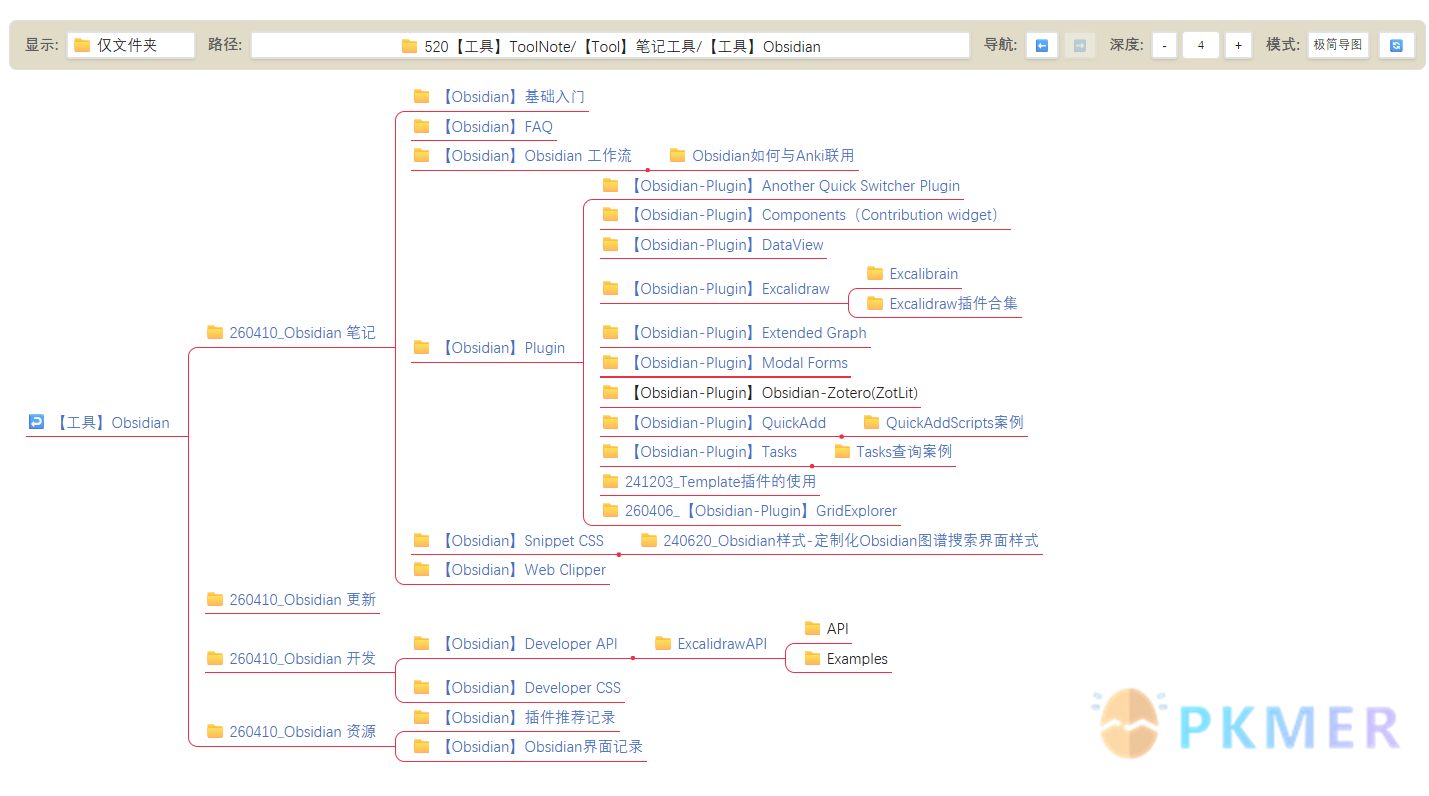
插件ID:dataviewjs-%E4%BA%A4%E4%BA%92%E5%BC%8F%E6%96%87%E4%BB%B6%E5%A4%B9%E5%B1%82%E7%BA%A7%E5%AF%BC%E8%88%AA-by-anyblock dataviewjs-%E4%BA%A4%E4%BA%92%E5%BC%8F%E6%96%87%E4%BB%B6%E5%A4%B9%E5%B1%82%E7%BA%A7%E5%AF%BC%E8%88%AA-by-anyblock dataviewjs %E4%BA%A4%E4%BA%92%E5%BC%8F%E6%96%87%E4%BB%B6%E5%A4%B9%E5%B1%82%E7%BA%A7%E5%AF%BC%E8%88%AA-by-anyblock:通过 Dataviewjs 结合 AnyBlock 插件,实现了一个交互式的文件夹层级导航系统。可以在 Obsidian 中以多种视图模式浏览、切换和探索整个知识库的文件夹结构。
Dataviewjs 交互式文件夹层级导航 by AnyBlock
概述
通过 Dataviewjs 结合 AnyBlock 插件,实现了一个交互式的文件夹层级导航系统。可以在 Obsidian 中以多种视图模式浏览、切换和探索整个知识库的文件夹结构。
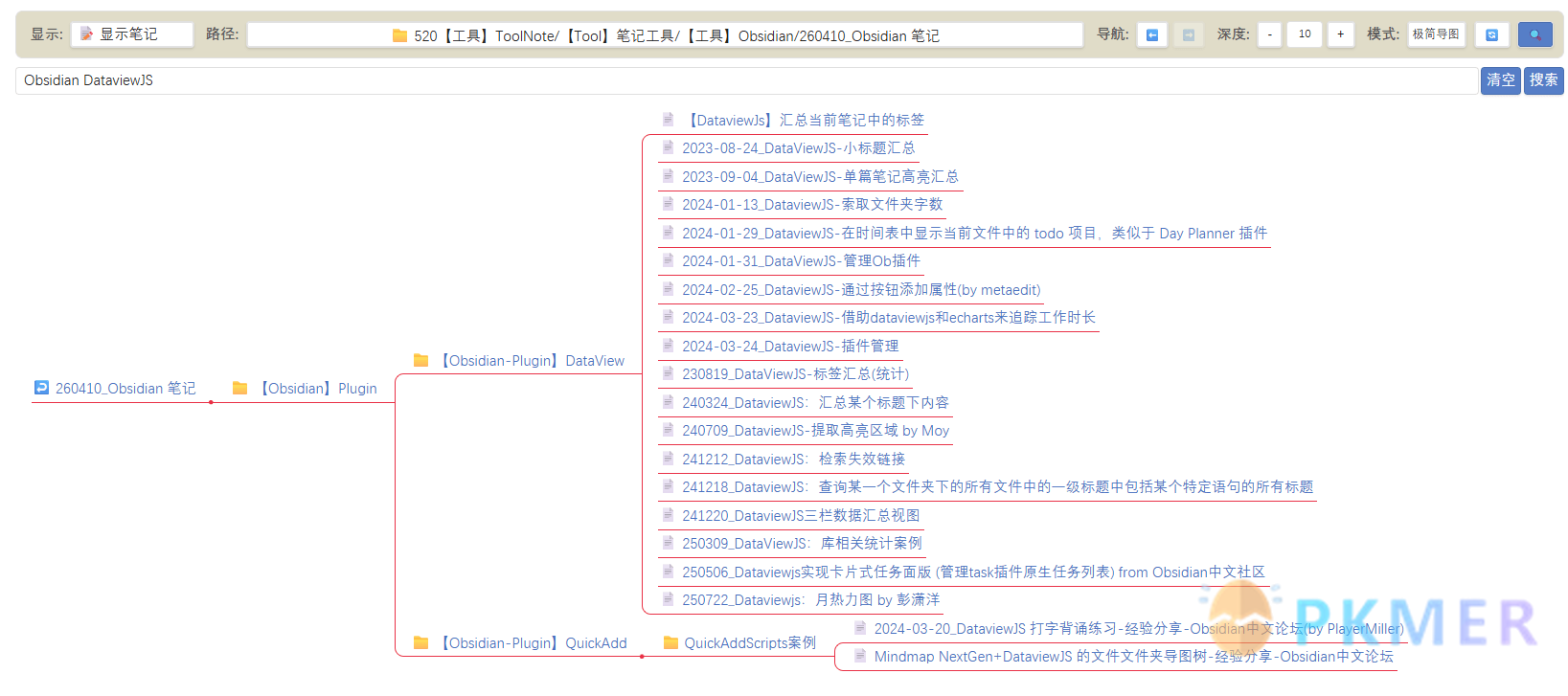
并且支持关键词筛选功能,能够根据关键词的筛选出特定文件夹或笔记:
功能特性
- 📂 文件夹层级浏览 — 从根目录开始,任意展开/聚焦子文件夹,支持前进/后退导航。
- 🎯 多种显示过滤 — 仅显示文件夹、显示笔记文件、仅显示 FolderNote(有同名笔记的文件夹)。
- 🔍 深度控制 — 通过步进器(Stepper)调节展开层级深度(1~10 级)。
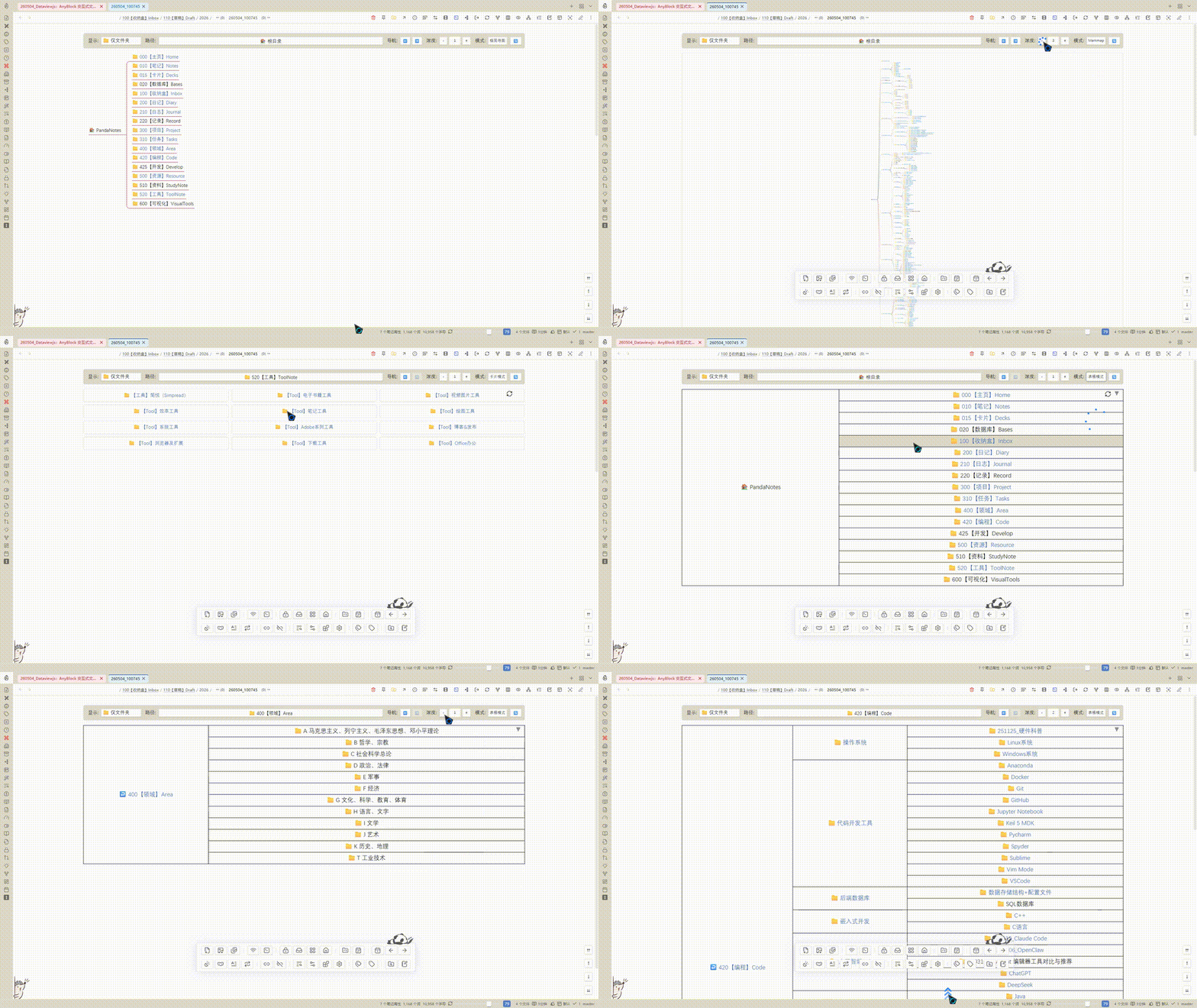
- 🎨 6 种视图模式 — 标准导图、极简导图、Markmap 思维导图、卡片模式、分栏模式、表格模式。
- ⚡ 路径快速跳转 — 点击路径按钮,通过 Suggester 快速跳转到任意文件夹。
- 🔄 状态保持 — 浏览路径、深度、模式自动保存,刷新页面后恢复。
使用说明
- 确保已安装并启用 Dataview 和 AnyBlock 插件。
- 将此笔记放置在任何位置,进入阅读/实时预览模式即可看到交互控件。
- 顶部的控制栏包含:
- 显示 — 切换显示过滤模式。
- 路径 — 点击弹出文件夹选择器,快速跳转。
- 导航 — ⬅️ 后退 / ➡️ 前进。
- 深度 — +/- 控制展开层级。
- 模式 — 切换 AnyBlock 渲染模式。
- 搜索 — 点击🔍展开搜索栏,输入关键词(空格分隔多个词)后回车或点击「搜索」,当前文件夹下仅显示匹配的文件夹和笔记;点击「清空」或再次点击 🔍 收起可恢复完整视图。
- 点击文件夹名称前的 emoji 图标(🏠/↩️/📁),即可聚焦到该文件夹。
- 自动检测 FolderNote 的笔记,对应文件夹名称显示未链接效果,点击即可打开
效果演示
Dataviewjs 代码
```dataviewjs
// --- 1. 基础配置区 ---
const config = {
    defaultFolder: "",
    folderNoteExtensions: ["md"],
    ignoreFolders: ["@", "tl", "7", "8", "9"],
    defaultDepth: 1,
    maxDepthLimit: 10,
    fontSizeVar: 1,
    modes: [
        { text: "原始列表", value: "", noRoot: false },
        { text: "节点导图", value: "[list2node]", noRoot: false },
        { text: "极简导图", value: "[list2node|addClass(min)]", noRoot: false },
        { text: "Markmap", value: "[list2markmap]", noRoot: false },
        { text: "卡片模式", value: "[list2card|addClass(ab-col3)]", noRoot: true },
        { text: "分栏模式", value: "[list2col|addClass(ab-col3)]", noRoot: true },
        { text: "表格模式", value: "[list2table]", noRoot: false },
    ],
    displayFilterModes: [
        { text: "📁 仅文件夹", value: "folderOnly" },
        { text: "📝 显示笔记", value: "showFiles" },
        { text: "📑 仅 FolderNote", value: "folderNoteOnly" }
    ],
    defaultModeIndex: 2
};

// --- 2. 全局状态 ---
if (!window.anyblockQueryData) {
    window.anyblockQueryData = {
        currentPath: config.defaultFolder,
        currentDepth: config.defaultDepth,
        currentModeIndex: config.defaultModeIndex,
        displayFilter: "folderOnly",
        history: [config.defaultFolder],
        historyIndex: 0,
        searchQuery: ""  // 新增搜索词
    };
}
const state = window.anyblockQueryData;

const navigateTo = (newPath) => {
    if (newPath === state.currentPath) return;
    state.history = state.history.slice(0, state.historyIndex + 1);
    state.history.push(newPath);
    state.historyIndex = state.history.length - 1;
    state.currentPath = newPath;
    saveState();
    renderNow();
};

const saveState = () => { window.anyblockQueryData = { ...state }; };

// --- 3. 数据预处理 ---
const allFiles = app.vault.getMarkdownFiles();
const allFolders = app.vault.getAllFolders();
const folderNoteMap = new Map();

allFolders.forEach(folder => {
    const note = allFiles.find(f => f.parent.path === folder.path && f.basename === folder.name);
    if (note) folderNoteMap.set(folder.path, note);
});

const folderPaths = ["/"].concat(
    allFolders
        .filter(f => f.path !== "/" && !config.ignoreFolders.some(ignore => f.path.includes(ignore)))
        .map(f => f.path).sort()
);

const displayNames = folderPaths.map(path => (path === "/" ? "🏠 根目录" : "📁 " + path));

// --- 4. UI 控件构建 ---
const createLabel = (text) => {
    const span = document.createElement("span");
    span.textContent = text;
    span.style.cssText = `font-size: 1rem; font-weight: bold; margin-left: 5px; color: var(--text-muted); white-space: nowrap;`;
    return span;
};

const controlContainer = document.createElement("div");
Object.assign(controlContainer.style, {
    display: "flex", gap: "8px", alignItems: "center", marginBottom: "5px",
    flexWrap: "nowrap",
    overflowX: "auto",
    whiteSpace: "nowrap",
    padding: "10px", backgroundColor: "var(--background-secondary)",
    borderRadius: "8px", border: "1px solid var(--background-modifier-border)",
    position: "sticky", top: "0px", zIndex: "100"
});

// A. 显示选项下拉菜单
const displaySelect = document.createElement("select");
Object.assign(displaySelect.style, { padding: "5px", borderRadius: "4px", background: "var(--background-primary)", color: "var(--text-normal)", border: "1px solid var(--background-modifier-border)", cursor: "pointer", fontSize: `${config.fontSizeVar}rem`, whiteSpace: "nowrap" });
config.displayFilterModes.forEach(m => {
    const opt = document.createElement("option"); opt.value = m.value; opt.textContent = m.text;
    if (m.value === state.displayFilter) opt.selected = true;
    displaySelect.appendChild(opt);
});
displaySelect.onchange = () => { state.displayFilter = displaySelect.value; saveState(); renderNow(); };

// B. 路径按钮
const pathBtn = document.createElement("button");
const updateBtnUI = (path) => {
    pathBtn.textContent = (path === "" || path === "/" ? "🏠 根目录" : "📁 " + path);
    backBtn.disabled = state.historyIndex <= 0;
    forwardBtn.disabled = state.historyIndex >= state.history.length - 1;
    backBtn.style.opacity = backBtn.disabled ? "0.3" : "1";
    forwardBtn.style.opacity = forwardBtn.disabled ? "0.3" : "1";
};
Object.assign(pathBtn.style, {
    flex: "1 1 200px", padding: "6px 10px", borderRadius: "4px",
    border: "1px solid var(--background-modifier-border)", backgroundColor: "var(--background-primary)",
    color: "var(--text-normal)", textAlign: "left", cursor: "pointer", fontSize: `${config.fontSizeVar}rem`,
    overflow: "hidden", whiteSpace: "nowrap", textOverflow: "ellipsis", minWidth: "0"
});
pathBtn.onclick = async () => {
    const selected = await app.plugins.plugins.quickadd.api.suggester(displayNames, folderPaths);
    if (selected !== undefined) navigateTo(selected === "/" ? "" : selected);
};

// C. 导航组
const navGroup = document.createElement("div");
navGroup.style.cssText = "display:flex; gap:4px; white-space: nowrap;";
const navBtnStyle = `padding: 4px 8px; cursor: pointer; border-radius: 4px; border: 1px solid var(--background-modifier-border); background: var(--background-primary); white-space: nowrap;`;
const backBtn = document.createElement("button"); backBtn.innerHTML = "⬅️"; backBtn.style.cssText = navBtnStyle;
backBtn.onclick = () => { if (state.historyIndex > 0) { state.historyIndex--; state.currentPath = state.history[state.historyIndex]; saveState(); renderNow(); } };
const forwardBtn = document.createElement("button"); forwardBtn.innerHTML = "➡️"; forwardBtn.style.cssText = navBtnStyle;
forwardBtn.onclick = () => { if (state.historyIndex < state.history.length - 1) { state.historyIndex++; state.currentPath = state.history[state.historyIndex]; saveState(); renderNow(); } };
navGroup.append(backBtn, forwardBtn);

// D. 深度控件
const stepper = document.createElement("div");
stepper.style.cssText = "display:flex; align-items:center; gap:4px; white-space: nowrap;";
const bStyle = `padding: 2px 10px; cursor: pointer; border-radius: 4px; border: 1px solid var(--background-modifier-border); background: var(--background-primary); color: var(--text-normal); font-weight: bold; white-space: nowrap;`;
const mBtn = document.createElement("button"); mBtn.textContent = "-"; mBtn.style.cssText = bStyle;
const pBtn = document.createElement("button"); pBtn.textContent = "+"; pBtn.style.cssText = bStyle;
const dInput = document.createElement("input");
Object.assign(dInput, { type: "number", min: "1", max: "10", value: state.currentDepth });
Object.assign(dInput.style, { width: "40px", textAlign: "center", border: "1px solid var(--background-modifier-border)", borderRadius: "4px", background: "var(--background-primary)", color: "var(--text-normal)" });
mBtn.onclick = () => { dInput.stepDown(); state.currentDepth = dInput.value; saveState(); renderNow(); };
pBtn.onclick = () => { dInput.stepUp(); state.currentDepth = dInput.value; saveState(); renderNow(); };
dInput.onchange = () => { state.currentDepth = dInput.value; saveState(); renderNow(); };
stepper.append(mBtn, dInput, pBtn);

// E. 模式选择
const mSelect = document.createElement("select");
Object.assign(mSelect.style, { padding: "5px", borderRadius: "4px", background: "var(--background-primary)", color: "var(--text-normal)", border: "1px solid var(--background-modifier-border)", cursor: "pointer", whiteSpace: "nowrap" });
config.modes.forEach((m, i) => {
    const opt = document.createElement("option"); opt.value = i; opt.textContent = m.text;
    if (i == state.currentModeIndex) opt.selected = true;
    mSelect.appendChild(opt);
});
mSelect.onchange = () => { state.currentModeIndex = mSelect.value; saveState(); renderNow(); };

const refreshBtn = document.createElement("button");
refreshBtn.innerHTML = "🔄";
Object.assign(refreshBtn.style, { padding: "6px 10px", borderRadius: "4px", border: "1px solid var(--background-modifier-border)", backgroundColor: "var(--background-primary)", cursor: "pointer", whiteSpace: "nowrap" });
refreshBtn.onclick = () => renderNow();

// --- 搜索相关 ---
const searchToggleBtn = document.createElement("button");
searchToggleBtn.innerHTML = "🔍";
Object.assign(searchToggleBtn.style, { padding: "6px 10px", borderRadius: "4px", border: "1px solid var(--background-modifier-border)", backgroundColor: "var(--background-primary)", cursor: "pointer", whiteSpace: "nowrap" });

// 搜索行(初始折叠)
const searchRowContainer = document.createElement("div");
searchRowContainer.style.cssText = "display:flex; justify-content:center; align-items:center; width: auto; height:0; overflow:hidden; margin-bottom:10px;";

const searchContainer = document.createElement("div");
searchContainer.style.cssText = "display:flex; justify-content:center; align-items:center; gap:3px; width:0; opacity:0; overflow:hidden; padding:5px 0;";

const searchInput = document.createElement("input");
searchInput.type = "text";
searchInput.placeholder = "搜索文件夹/笔记(空格分隔关键词)";
Object.assign(searchInput.style, {
    fontSize: `${config.fontSizeVar}rem`,
    color: "var(--text-normal)",
    backgroundColor: "var(--background-primary)",
    border: "1px solid var(--background-modifier-border)",
    borderRadius: "4px",
    padding: "3px 8px",
    outline: "none",
    flex: "1",
    minWidth: "120px"
});

const clearSearchBtn = document.createElement("button");
clearSearchBtn.textContent = "清空";
Object.assign(clearSearchBtn.style, { border: "none", margin: "0", fontSize: `${config.fontSizeVar}rem`, color: "var(--text-on-accent)", cursor: "pointer", padding: "5px 6px", backgroundColor: "var(--interactive-accent)", borderRadius: "4px", whiteSpace: "nowrap" });

const searchExecuteBtn = document.createElement("button");
searchExecuteBtn.textContent = "搜索";
Object.assign(searchExecuteBtn.style, { border: "none", margin: "0", fontSize: `${config.fontSizeVar}rem`, color: "var(--text-on-accent)", cursor: "pointer", padding: "5px 6px", backgroundColor: "var(--interactive-accent)", borderRadius: "4px", whiteSpace: "nowrap" });

let searchExpanded = false;

const setSearchUI = (expanded) => {
    searchExpanded = expanded;
    if (expanded) {
        searchRowContainer.style.height = "auto";
        searchContainer.style.width = "100%";
        searchContainer.style.opacity = "1";
        searchToggleBtn.style.backgroundColor = "var(--interactive-accent)";
        searchToggleBtn.style.color = "var(--text-on-accent)";
        searchInput.focus();
    } else {
        searchRowContainer.style.height = "0";
        searchContainer.style.width = "0";
        searchContainer.style.opacity = "0";
        searchToggleBtn.style.backgroundColor = "var(--background-primary)";
        searchToggleBtn.style.color = "var(--text-normal)";
    }
};

searchToggleBtn.onclick = () => setSearchUI(!searchExpanded);

const executeSearch = () => {
    const query = searchInput.value.trim();
    state.searchQuery = query;
    saveState();
    renderNow();
};

clearSearchBtn.onclick = () => {
    searchInput.value = "";
    state.searchQuery = "";
    saveState();
    renderNow();
};

searchExecuteBtn.onclick = executeSearch;
searchInput.onkeypress = (e) => {
    if (e.key === "Enter") executeSearch();
};

// 组装搜索
searchContainer.append(searchInput, clearSearchBtn, searchExecuteBtn);
searchRowContainer.appendChild(searchContainer);

// 恢复搜索框状态和内容
if (state.searchQuery) {
    searchInput.value = state.searchQuery;
}

// 组装控制栏
controlContainer.append(
    createLabel("显示:"), displaySelect,
    createLabel("路径:"), pathBtn,
    createLabel("导航:"), navGroup,
    createLabel("深度:"), stepper,
    createLabel("模式:"), mSelect,
    refreshBtn,
    searchToggleBtn
);

// 包装控制栏和搜索行
const wrapperContainer = document.createElement("div");
wrapperContainer.append(controlContainer, searchRowContainer);
dv.container.appendChild(wrapperContainer);

// 如果之前搜索是展开的,恢复展开状态
if (state.searchQuery) {
    setSearchUI(true);
}

const drawArea = document.createElement("div");
drawArea.style.fontSize = `${config.fontSizeVar}rem`;
dv.container.appendChild(drawArea);

// --- 5. 渲染逻辑 ---
async function renderNow() {
    drawArea.innerHTML = "";
    updateBtnUI(state.currentPath);

    const mode = config.modes[state.currentModeIndex];
    const searchPath = (state.currentPath === "/" || state.currentPath === "") ? "" : state.currentPath;
    let root = searchPath === "" ? app.vault.getRoot() : app.vault.getAbstractFileByPath(searchPath);

    if (!root) { drawArea.setText("⚠️ 找不到路径: " + state.currentPath); return; }

    // 解析搜索关键词
    const keywords = state.searchQuery.trim().split(/\s+/).filter(k => k.length > 0).map(k => k.toLowerCase());

    const getSafeLink = (name, path) => `[${name.replace(/\[/g, "\\[").replace(/\]/g, "\\]")}](${encodeURI(path)})`;

    const getName = (f, isRootNode) => {
        const note = folderNoteMap.get(f.path);
        const isVaultRoot = (f.path === "/" || f.path === "");
        const displayName = isVaultRoot ? app.vault.getName() : f.name;
        const link = note ? getSafeLink(displayName, note.path) : displayName;

        let emoji = "📁";
        let targetPath = f.path;
        if (isRootNode) {
            emoji = isVaultRoot ? "🏠" : "↩️";
            if (!isVaultRoot) targetPath = root.parent ? root.parent.path : "";
        }
        return `<span class="focus-btn" data-path="${targetPath}" style="cursor:pointer;margin-right:4px;">${emoji}</span>${link}`;
    };

    // 检查路径是否匹配所有关键词
    const isMatch = (path) => {
        if (keywords.length === 0) return true;
        const lowerPath = path.toLowerCase();
        return keywords.every(kw => lowerPath.includes(kw));
    };

    // 修改后的getTree,增加关键词过滤
    const getTree = (folder, d, startD) => {
        if (d > parseInt(state.currentDepth) || !folder.children) return "";
        const space = " ".repeat((d - startD) * 4);

        const subFolders = Array.from(folder.children)
            .filter(c => c.children && !config.ignoreFolders.some(i => c.path.includes(i)) && !c.name.startsWith('.'))
            .sort((a, b) => a.name.localeCompare(b.name))
            .map(c => {
                const hasNote = folderNoteMap.has(c.path);
                const subTree = getTree(c, d + 1, startD);

                // 关键词过滤逻辑
                const selfMatch = isMatch(c.path);
                const hasMatchingDescendant = subTree !== "";

                // 确定是否展示该文件夹行
                let showFolder = false;
                if (keywords.length > 0) {
                    // 搜索模式下:自身匹配或后代有匹配项
                    showFolder = selfMatch || hasMatchingDescendant;
                } else {
                    // 无搜索:沿用原有逻辑
                    if (state.displayFilter === "folderNoteOnly") {
                        showFolder = hasNote || subTree !== "";
                    } else {
                        showFolder = true; // folderOnly 或 showFiles 均显示所有文件夹(showFiles会额外处理文件)
                    }
                }

                if (!showFolder) return "";

                // 生成该文件夹行
                const folderLine = `${space}- ${getName(c, false)}\n`;
                return folderLine + subTree;
            });

        let subFiles = [];
        if (state.displayFilter === "showFiles") {
            const folderNote = folderNoteMap.get(folder.path);
            subFiles = Array.from(folder.children)
                .filter(c => !c.children && c.extension === 'md' && (!folderNote || c.path !== folderNote.path))
                .sort((a, b) => a.name.localeCompare(b.name))
                .map(c => {
                    const match = isMatch(c.path);
                    if (keywords.length > 0 && !match) return "";
                    return `${space}- 📄 ${getSafeLink(c.basename, c.path)}\n`;
                });
        }

        return subFolders.concat(subFiles).filter(s => s !== "").join("");
    };

    let md = "";
    if (mode.noRoot) {
        md = getTree(root, 1, 1);
    } else {
        const rootName = getName(root, true);
        const rootMatch = isMatch(root.path);
        if (keywords.length > 0 && !rootMatch) {
            // 根不匹配,但若子树有内容仍显示根(否则空)
            const subTree = getTree(root, 1, 0);
            if (subTree.trim() === "") {
                md = "";
            } else {
                md = `- ${rootName}\n${subTree}`;
            }
        } else {
            md = `- ${rootName}\n` + getTree(root, 1, 0);
        }
    }

    if (keywords.length > 0 && md.trim() === "") {
        drawArea.innerHTML = `<p style="text-align:center; color:var(--text-muted);">🔍 没有找到匹配 “${state.searchQuery}” 的文件夹或笔记</p>`;
        return;
    }

    const code = `\`\`\`anyblock\n${mode.value}\n${md.trimEnd()}\n\`\`\``;
    await obsidian.MarkdownRenderer.renderMarkdown(code, drawArea, "", dv.component);

    drawArea.querySelectorAll('.focus-btn').forEach(el => {
        el.onclick = (e) => {
            e.preventDefault();
            const p = el.getAttribute('data-path');
            navigateTo(p === "/" ? "" : p);
        };
    });
}

renderNow();
```
配置说明
如需自定义,修改代码顶部 config 对象的参数:
| 参数 | 说明 |
|---|---|
defaultFolder | 默认起始路径,如果为空则为根目录 |
ignoreFolders | 忽略的文件夹(路径包含即跳过),可以简写为开始的几个字符 |
defaultDepth | 默认展开深度,默认为 1 |
maxDepthLimit | 最大深度限制,默认为 10 |
modes | 自定义 AnyBlock 渲染模式,目前有 list2node,list2card,list2col,list2markmap 等几种模式 |
displayFilterModes | 自定义显示过滤选项,有仅显示文件夹,仅显示 FolderNote,显示笔记等选项 |
拓展样式
关于几种 Anyblock 效果可能显示不一样,原因是我这边修改过 Anyblock 几种视图的样式,需要自取,另存为 css 文件到 Obsidian 的 Snippets 文件夹即可。
/* !list2ut样式 */
.ab-note table.ab-table td, .ab-note table.ab-table th {
  white-space: normal;
  overflow-wrap: break-word;
  padding: 2px 5px;
  border: solid var(--ab-table-border-width) var(--ab-table-border-color);

  /* 文本水平居中 */
  text-align: center;
}

/* !标签页模式 */
.ab-tab-root.ab-tab-root.ab-tab-root {
  .ab-tab-nav {
    background-color: var(--background-primary);
    border-bottom: 1px solid var(--background-modifier-border);

    overflow: visible !important;
    text-overflow: none !important;

    .ab-tab-nav-item {
      background-color: transparent;

      overflow: visible !important;
      text-overflow: ellipsis !important;
      &[is_activate="true"] {
        color: var(--interactive-accent);
        border-bottom: 4px solid var(--interactive-accent);
      }

      &:hover {
        color: var(--interactive-accent);
      }
    }

  }

  .ab-tab-content {
    background-color: var(--background-primary-alt);
    color: unset;
  }

}

.ab-line-yellow {
  text-decoration: none !important;
}


/* !list2card模式 */
.ab-items.ab-card.ab-card.ab-card.ab-card {
  display: grid !important;
  grid-template-columns: repeat(auto-fit, minmax(300px, 1fr)) ;

  &.ab-col2 {
    grid-template-columns: repeat(2, 1fr) ;
  }

  &.ab-col3 {
    grid-template-columns: repeat(3, 1fr) ;
  }

  &.ab-col4 {
    grid-template-columns: repeat(4, 1fr) ;
  }

  .ab-items-item {
    .ab-items-title {
      text-align: center;
      overflow: hidden;
      max-width: 100%;
      text-wrap: nowrap;
      text-overflow: ellipsis;
      border-bottom: none !important;
      color: var(--text-normal);
    }

    .ab-items-content {
      font-size: smaller;
    }

    p:has(span>img) {
      width: 100%;
      text-align: center;
    }

    img {
      object-fit: contain;
      max-width: 100%;
    }
  }

  div[class=".ab-items-item.placeholder"] {
    display: none;
  }
}

/* !col模式 */
.ab-items.ab-col.ab-col.ab-col.ab-col {
  display: grid;
  gap: 20px;
  grid-template-columns: repeat(auto-fit, minmax(380px, 1fr)) ;

  &.ab-col2 {
    grid-template-columns: repeat(2, 1fr) ;
  }

  &.ab-col3 {
    grid-template-columns: repeat(3, 1fr) ;
  }

  &.ab-col4 {
    grid-template-columns: repeat(4, 1fr) ;
  }

  .ab-items-item {
    background-color: var(--background-primary-alt);
  }

  .ab-items-item:nth-of-type(4n+1) {
    border-top: 5px solid #FF9800;

    .ab-items-title,
    li::marker {
      color: #FF9800;
    }
  }

  .ab-items-item:nth-of-type(4n+2) {
    border-top: 5px solid #4CAF50;

    .ab-items-title,
    li::marker {
      color: #4CAF50;
    }
  }

  .ab-items-item:nth-of-type(4n+3) {
    border-top: 5px solid #2196F3;

    .ab-items-title,
    li::marker {
      color: #2196F3;
    }
  }

  .ab-items-item:nth-of-type(4n+4) {
    border-top: 5px solid #9C27B0;

    .ab-items-title,
    li::marker {
      color: #9C27B0;
    }
  }

  .ab-items-item {
    border-radius: 10px;
    box-shadow: 0 2px 10px rgba(0, 0, 0, 0.1);


    .ab-items-title {
      text-align: center;
      border-bottom: none !important;
      font-weight: bolder;
      font-family: 'Times New Roman', '黑体';
    }
  }
}

/* markmap格式 */
.ab-note .ab-markmap-svg {
  border: solid 1px var(--background-modifier-border);
  border-radius: 6px;
  width: 100%;
}

/* !timeline */
.ab-note table.ab-table-timeline td[col_index="0"] {
  border: none;
  border-left: none;
  border-right: solid 5px rgb(148, 143, 143, 0.468);
  padding-left: 5px;
  padding-right: 20px;
  position: relative;
  overflow: visible;


}

.ab-table-timeline {
  tr>td:first-of-type {
    font-family: 黑体;
    font-weight: bolder;
  }
}
## Tip:配合 Modal opener 插件
配合 Modal opener 插件,方便随时调用:
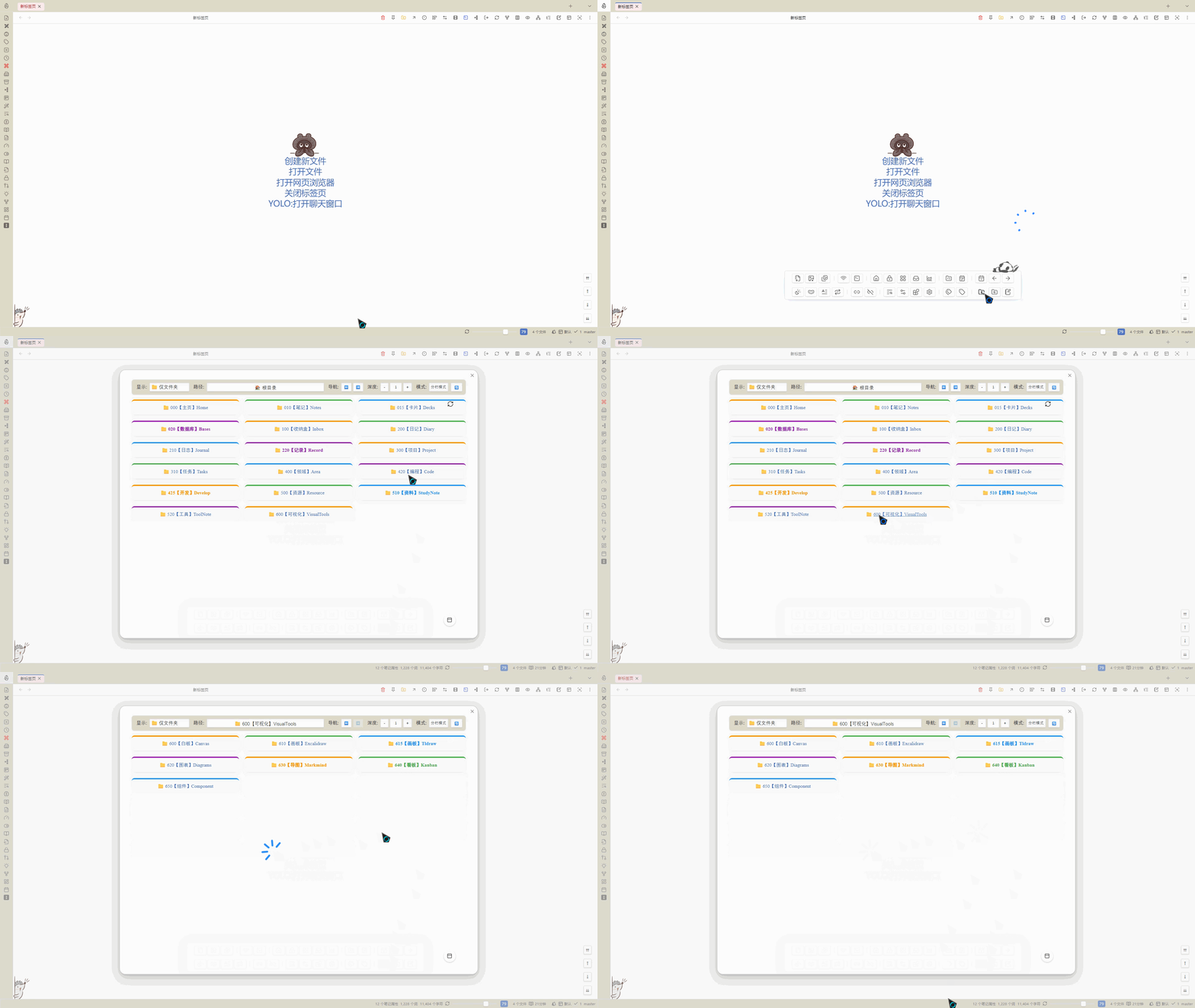
具体配置如下:
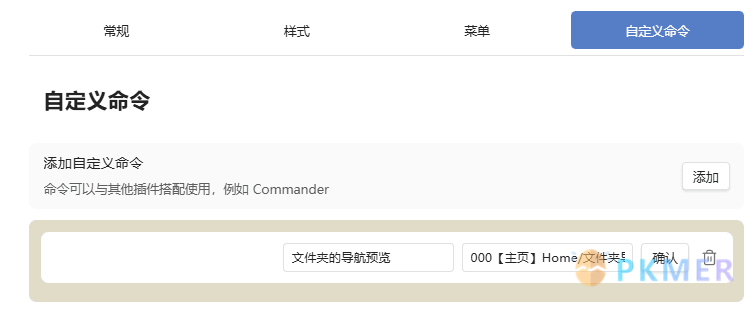
写在最后
感谢 Anyblock 插件的伟大,Anyblock 的功能不止如此,可以根据自己的需要和设定添加其他的视图模式。